A single-line diagram can look simple and still be difficult to read. One line may represent a multiphase circuit, a small symbol may stand for a major protective device, and a short label may carry the information that determines what equipment belongs downstream.
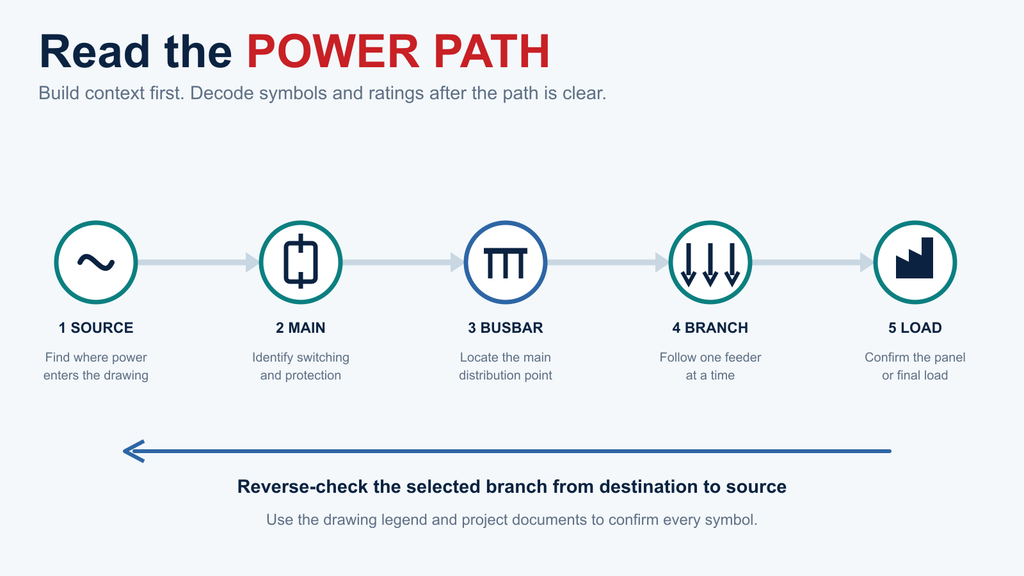
The most reliable way to read a single-line diagram is to follow the power path from the source to the loads. Identify the main switching and protection point, find the busbar, follow each feeder branch, and then check the labels beside every device. Use the drawing legend and project documents to confirm each symbol. A single-line diagram is a system map; it is not a wiring instruction or a safe-isolation procedure.
What Is a Single-Line Diagram?
A single-line diagram, also called a one-line diagram or SLD, is a simplified representation of an electrical power distribution system. It shows how major equipment is connected and how power is distributed from a source through switching and protective devices to downstream panels and loads.
The single line does not necessarily represent one physical conductor. In a three-phase system, it can represent the power path without drawing every phase conductor separately. This makes the system hierarchy easier to see, but it also means the SLD cannot replace detailed wiring drawings, cable schedules, panel schedules, equipment manuals, or approved work procedures.
An SLD commonly shows
An SLD does not establish by itself
Sources and voltage levels
Exact terminal-to-terminal wiring
Main and branch switching devices
A safe isolation or switching procedure
Protective devices and their system positions
Final protection settings or conductor sizing
Busbars, feeders, panels, and major loads
Compliance with every local requirement
Selected equipment ratings and identifiers
The complete internal arrangement of an enclosure
The drawing legend remains the authority for the symbols used on a particular project. IEC 60617 provides an international database of graphical symbols for electrotechnical diagrams, but actual project drawings may also use regional conventions, company standards, or legacy notation.
How to Read a Single-Line Diagram in Five Steps
Do not begin by trying to identify every symbol on the page. First find the system path. Once that path is clear, the symbols and labels have a context.
Figure 1. Read an SLD by following the power path, then reverse-checking the selected branch.
Step 1 Start at the Source
Find where power enters the part of the system shown on the drawing. The source may be identified as a utility supply, generator, transformer secondary, inverter, or an incoming feeder from another board.
Read the information printed beside it. Look for the nominal voltage, AC or DC designation, phase information, frequency where relevant, and the drawing reference that shows where the source continues. If the drawing begins at a transformer secondary or an incoming feeder, remember that the upstream system may be documented on another sheet.
Do not count the drawn lines and assume that they equal the number of installed conductors. The purpose of the SLD is to simplify the system. Conductor details must be confirmed in the applicable cable, wiring, or installation documentation.
Step 2 Find the Main Disconnect and Protection
Follow the line from the source to the first main switching or protective device. Depending on the system, this could be a switch-disconnector, fused switch, circuit breaker, or another approved assembly.
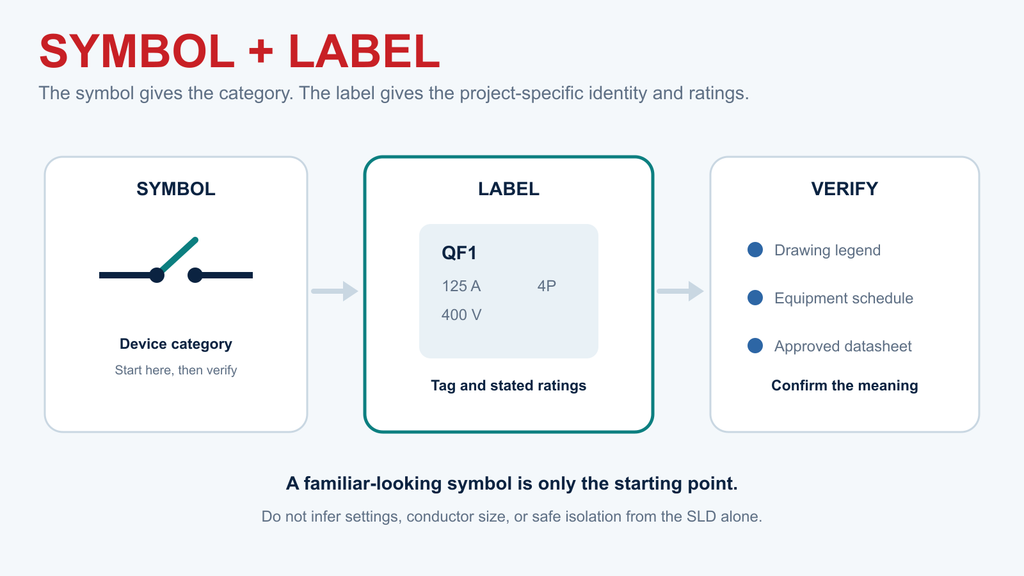
Separate the device symbol from the information written beside it. The symbol identifies the device category; the labels may identify its tag, rated current, voltage, frame or trip information, number of poles, or fault-interruption rating. Not every drawing includes the same fields.
At this stage, your task is to identify the device and its position in the system. Do not infer an operating sequence, protection setting, or safe point of isolation from the SLD alone. Those decisions require current project procedures, equipment information, and qualified personnel.
Step 3 Follow the Busbar and Feeder Branches
The main device often connects to a busbar. On the drawing, the busbar acts as a distribution point: one incoming path supplies several outgoing feeders.
Trace each line leaving the busbar. Check whether it feeds another distribution board, a motor control assembly, a dedicated machine, a lighting panel, or another major load. Feeder tags and cross-references may lead to another drawing sheet.
This branching structure is one of the most valuable features of an SLD. It shows which parts of the system sit upstream or downstream of one another. It does not show the physical routing of every conductor or the exact terminal arrangement inside the panel.
Step 4 Identify Each Branch Protective Device
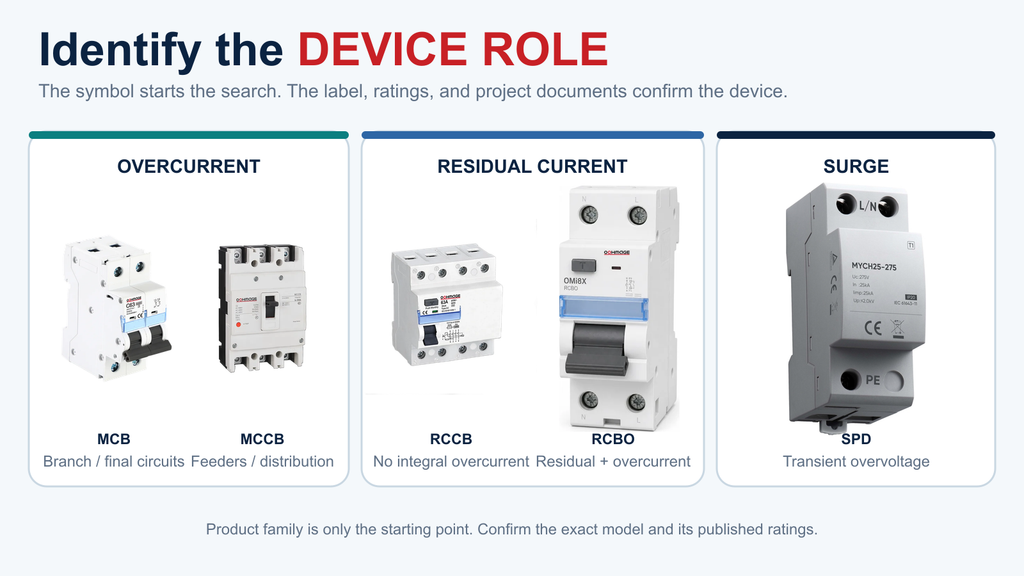
Each outgoing feeder may pass through a protective or switching device before it reaches the next panel or load. Common examples include MCBs, MCCBs, fuses, RCCBs, RCBOs, and surge protective devices.
These devices are not interchangeable labels. An MCB or MCCB can provide overcurrent protection within its verified ratings. An RCCB is associated with residual-current protection and normally requires appropriate overcurrent protection elsewhere in the circuit. An RCBO combines residual-current and overcurrent functions in one device. An SPD is installed to limit transient overvoltage within a coordinated protection arrangement.
Figure 2. Match the device family to its protection role, then confirm the label and ratings.
Use the project legend to confirm how each device is drawn. Then read its nearby tag and ratings. If you need a broader symbol reference, the OOHMAGE Electrical Symbols Guide and Circuit Breaker Symbols Guide can help you identify the relevant symbol family. The final device selection must still follow the approved design and manufacturer documentation.
Step 5 Trace the Path to the Final Panel or Load
Continue along the feeder until it reaches a downstream distribution box, panelboard, item of equipment, or load group. Record the destination tag and any drawing reference.
Now trace the same route backward. Starting from the destination, identify the first upstream protective device, the busbar supplying it, and the main device above that busbar. This reverse check helps confirm that you followed the correct branch when several feeders cross or continue onto other sheets.
Being able to trace an upstream path does not make the nearest device a verified isolation point. Isolation, switching, and work authorization must follow the current site procedure and be performed by qualified personnel.
The Symbols and Labels That Matter Most
You do not need to memorize an entire symbol library before reading an SLD. Focus on the small group of items that establishes the system hierarchy, and verify each one against the drawing legend.
Figure 3. A symbol identifies a category; the label and project documents confirm its meaning.
A familiar-looking symbol is only the starting point. The tag, ratings, legend, and equipment schedule determine what the symbol means in that drawing.
How to Read Ratings Without Guessing
SLDs often place several values beside a device. Read each value as a separate field rather than treating the largest number as the complete equipment specification.
Label or field
Question it helps answer
Do not assume
Nominal voltage
Which system voltage is shown?
That every downstream device has already been verified for it
Phase or conductor notation
What system arrangement is intended?
That the SLD shows every physical conductor
Rated current
What current rating is assigned to the device or assembly?
That it defines every protection setting
Interrupting or fault rating
What stated fault-duty value applies?
That one value can be transferred between standards or devices
Device tag
Which scheduled item does this symbol represent?
That a similar symbol has the same specification
Feeder or cable reference
Where are conductor details documented?
That the line on the SLD supplies those details by itself
Panel or circuit identifier
Which board or circuit is being referenced?
That the internal layout is complete on this sheet
If a label is missing or ambiguous, note the gap instead of filling it from experience. Use the equipment schedule, panel schedule, approved datasheet, calculation package, and manufacturer documentation to resolve it. An SLD can tell you where a protection device sits, but it cannot by itself determine conductor size, trip settings, selectivity, or local compliance.
Single-Line Diagram vs Wiring Diagram vs Panel Schedule
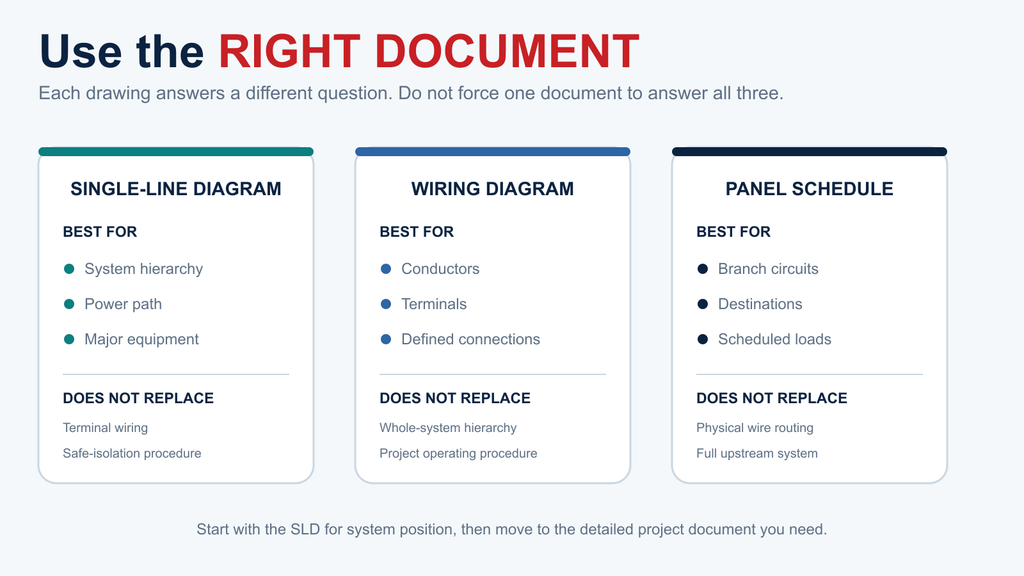
These documents answer different questions. A complete project may require all three.
Document
Best used for
What it does not replace
Single-line diagram
Understanding system hierarchy, major equipment, and power flow
Detailed connections, final settings, or work procedures
Wiring diagram
Understanding specified conductor and terminal connections
The high-level distribution view of the complete system
Panel schedule
Reviewing panel circuits, destinations, and scheduled load information
Physical wiring details or the full upstream system path
Figure 4. Use the SLD, wiring diagram, and panel schedule for different questions.
If you are trying to understand where a distribution board receives power, begin with the SLD. If you need to identify a terminal connection, move to the applicable wiring drawing. If you need the list of branch circuits inside the board, check the panel schedule. Never force one document to answer a question it was not prepared to answer.
A Low-Voltage Distribution Example
Consider a conceptual path:
Source → Main MCCB → Main busbar → Branch protection → Distribution box or final loads
Start by recording the source label and system information. Move to the main MCCB and record its device tag and the ratings stated on the drawing. Follow the line to the main busbar, then choose one outgoing feeder and identify the branch protective device. Continue to the downstream distribution box and note its board tag and drawing reference.
Repeat the same process for the remaining feeders. One branch may supply another distribution board, while others may supply dedicated equipment. An SPD may appear beside a bus or within a panel arrangement rather than in series with every downstream load. Residual-current and overcurrent devices may be shown at different levels depending on the design.
This example is intentionally free of universal current values, cable sizes, or trip settings. Those values depend on the actual system, applicable standards, design calculations, installation conditions, and verified equipment. The purpose of the example is to establish a reading sequence, not to provide a design or installation drawing.
Common Mistakes When Reading an SLD
Treating One Line as One Conductor
The line represents a simplified circuit path. Check phase and conductor information in the project documents instead of interpreting the graphic literally.
Ignoring the Drawing Legend
Symbols can vary by standard, region, company, and drawing age. Use the legend on the current drawing before relying on a general symbol reference.
Reading the Symbol but Skipping the Label
Two breaker symbols can represent devices with different ratings and functions. Read the tag and specification fields, then find the matching schedule or datasheet.
Using an Outdated Revision
An old SLD may no longer reflect the installed system. Confirm the drawing number, revision, approval status, and project change records before using it for a technical decision.
Treating the SLD as a Wiring or Isolation Procedure
The drawing does not provide all physical connections or prove a safe work state. Use approved procedures and qualified personnel for switching, isolation, testing, and installation work.
Assuming a Distribution Box Is Fully Specified
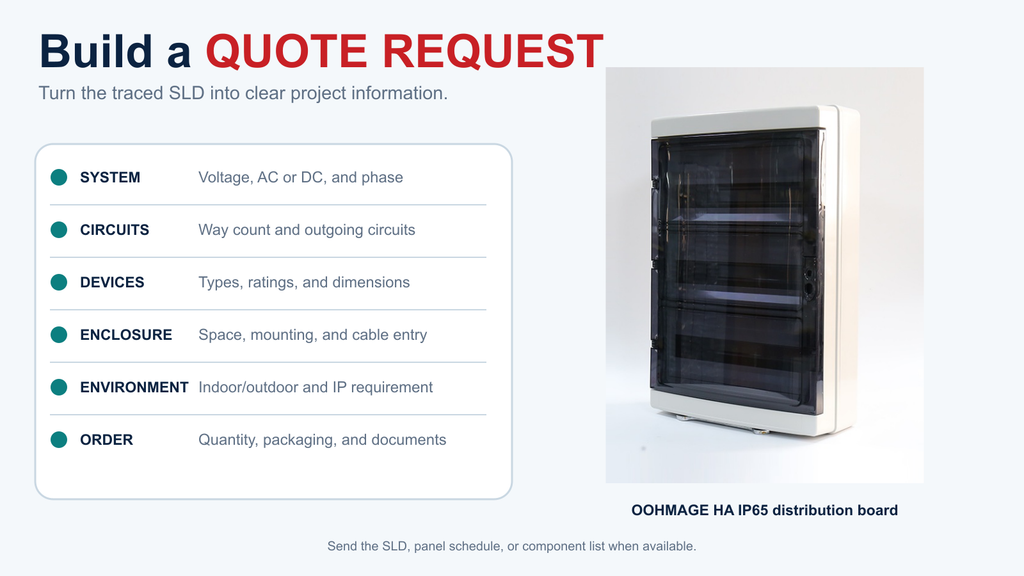
A box symbol and way count do not define its complete configuration. Internal device dimensions, cable entry, mounting, environmental protection, labels, documentation, and project requirements still need confirmation.
What to Send When Requesting a Distribution Box Quote
Once you have traced the SLD, convert the drawing information into a clear project request. Include:
Target market and project application
System voltage, AC or DC, and phase arrangement
Required way count or number of outgoing circuits
Proposed protective devices and their physical dimensions
Incoming and outgoing cable requirements
Mounting method and available installation space
Indoor or outdoor environment and required ingress protection
Quantity and packaging requirements
Relevant SLD, panel schedule, or component list
Required technical and commercial documentation
OOHMAGE supplies IP65 electrical distribution box options in multiple way-count ranges. Final selection depends on the actual device layout, enclosure space, cable entry, mounting method, and installation environment. Review the Distribution Box range and send the project information above for model confirmation and quotation.
Figure 5. Information to prepare when requesting a distribution box quotation.
Frequently Asked Questions
Is a single-line diagram the same as a wiring diagram?
No. A single-line diagram summarizes the system hierarchy and power path. A wiring diagram provides more detailed connection information for a defined part of the installation. The two documents support each other but are not interchangeable.
Why does a three-phase system appear as one line?
The drawing is simplified so the reader can see the power-distribution structure without repeating every phase conductor. Phase, conductor, and connection details must be confirmed from the labels and the applicable project documents.
Are single-line diagram symbols the same everywhere?
Many symbols follow recognized IEC or other industry conventions, but actual drawings can use regional, company-specific, or legacy variations. Always check the legend and revision of the drawing being reviewed.
What information is needed before selecting a distribution box?
Confirm the system voltage and phase, way count, protective-device layout and dimensions, cable entry, mounting method, installation environment, ingress-protection requirement, quantity, and required documentation. A box should not be selected by way count alone.
Figure 1. Three-phase SPD selection starts with system facts, not the largest kA number. A three-phase surge protector should not be selected by the largest kA number on its label. First confirm the system voltage, whether a neutral is present, the earthing arrangement, the installation point, and the required SPD type. Then compare Uc, Up, […]
An AC-only miniature circuit-breaker,you cannot treat it as a DC circuit by default.Confirm before using: If the manufacturer explicitly rates the selected model for the required DC voltage, pole arrangement, polarity where applicable, fault current, and breaking capacity.Some breakers carry both AC and DC ratings, but these alone cannot reflect the actual situation. If the […]
This buyer‑focused guide compares 2‑pole and 4‑pole RCCBs for single‑phase and three‑phase‑four‑wire systems. It walks you through selecting the correct RCCB type, residual‑current sensitivity and protection coordination. Multiple practical checklists, frequent‑selection mistakes and quotation‑ready specification lists are included to help distributors, panel builders and installers specify the right residual‑current breaker and prevent unwanted tripping.